If your customers can reach you on WhatsApp, they will, usually at the least convenient moment, which is exactly why so many businesses now want a WhatsApp chatbot. A table for four tonight. A quote for a deep clean. "Is the 2-bed still available?" For many businesses, especially across the UAE and the wider Gulf, WhatsApp isn't just another channel. It's where people actually decide who to buy from.
A good WhatsApp chatbot replies instantly, answers the common questions and passes the serious buyers to a human. Done well, it's one of the highest-return things a service business can set up. Done badly, it's a robotic menu that sends customers straight to a competitor.
This guide covers what you need to know to get it right: how WhatsApp chatbots work, the rules Meta sets, what they really cost, how to set one up, and the mistakes we see most often.
#What is a WhatsApp chatbot?
A WhatsApp chatbot is software connected to your WhatsApp Business number that reads incoming messages and replies automatically. Older chatbots worked like phone menus ("Reply 1 for prices, 2 for location"). Modern AI chatbots understand normal, messy human messages ("hey u open fri night? how much 4 two ppl") and reply in natural language.
A good WhatsApp chatbot does three jobs:
- Answers questions instantly and accurately, using your real prices, hours and policies.
- Captures the customer's intent: what they want, when, for how many people.
- Hands over to your team at the right moment, with the full context, so nobody has to ask the same questions twice.
This is the first thing that confuses people, so let's clear it up. There are two different products.
| WhatsApp Business app | WhatsApp Business Platform (API) |
|---|
| Who it's for | Small businesses replying by hand from a phone | Businesses that want automation, a team inbox or integrations |
| Automation | Basic greeting and away messages, quick replies | Full chatbots and AI assistants |
| Team access | Limited to linked devices | Any number of agents through software |
| Integrations | None | CRMs, calendars, payment links, analytics |
| Cost | Free | Software cost plus Meta's per-message fees for templates |
The free app is great for a sole trader replying personally. But a real chatbot, one that answers on its own and works with a team, needs the WhatsApp Business Platform, Meta's official API. Be wary of tools that automate the regular WhatsApp app through unofficial workarounds: they break Meta's terms and can get your number banned.
#What a WhatsApp chatbot can do for your business
Here are the jobs where we see WhatsApp automation pay off fastest.
#Answer the same questions, all day, instantly
Prices, opening hours, location, parking, what's included, cancellation policy. These make up a large share of most businesses' messages, and every one has an answer you've already written somewhere.
#Take bookings and booking requests
A good assistant collects everything needed in one natural conversation (date, time, party size, name) and either confirms against a live calendar or sends your team a complete request. Because it's WhatsApp, the customer's phone number is already known, so there's no need to ask for it.
#Follow up when customers go quiet
People get distracted. A friendly, specific nudge the next day ("Still keen on the sunset cruise for Saturday? We have the 5:30 slot free") brings a surprising number of them back.
#Reduce no-shows
A reminder the day before a booking is simple and effective. So is a deposit link sent in the chat for higher-value bookings.
#Bring past customers back
With approved template messages, you can send a relevant offer to customers who contacted you before, and have the chatbot handle every reply.
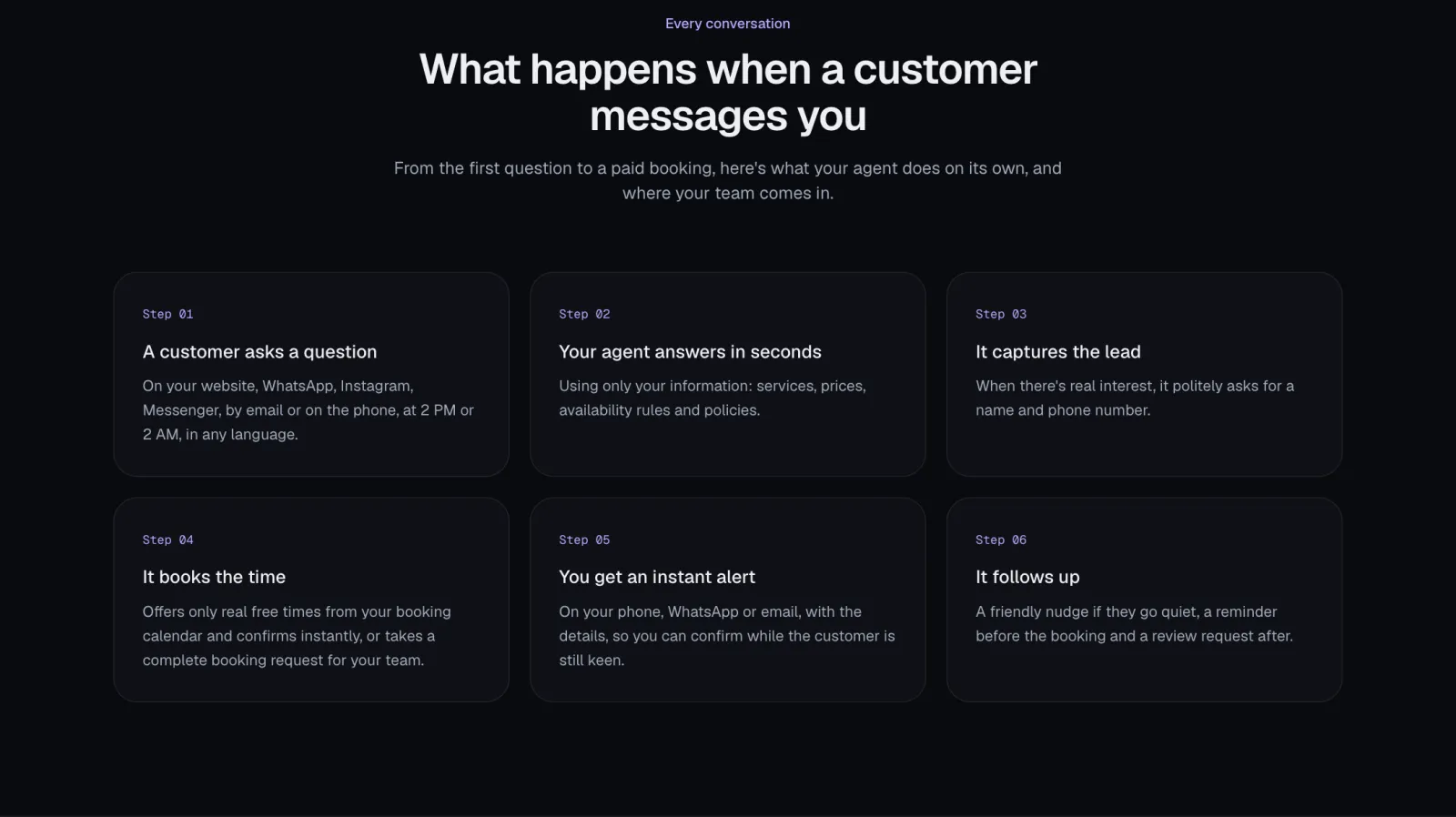 From first message to follow-up: what the assistant handles and where your team steps in
WhatsApp protects its users fiercely, which is a good thing; it's why people trust the app. As a business, you need to know four rules.
#1. The 24-hour customer service window
When a customer messages you, a 24-hour window opens. Inside it, you (or your chatbot) can reply freely with normal messages. Each new message from the customer restarts the window. This is where almost all chatbot conversations happen.
#2. Templates outside the window
To message someone who hasn't contacted you in the last 24 hours, for example a follow-up the next week or a campaign, you must use a message template that Meta has approved. Templates are categorised (marketing, utility, authentication) and are charged per message by Meta.
#3. Opt-in and opt-out
You can only message people who have agreed to hear from you, and you must respect anyone who asks you to stop. A good platform tracks opt-outs automatically and stops sending to those numbers.
#4. Quality matters
If lots of people block or report your messages, Meta lowers your number's quality rating and can limit how many messages you can send. The fix is simple: send relevant messages to people who want them, and don't blast everyone with everything.
You can read the full details in Meta's WhatsApp Business Messaging Policy and the template message guide.
#How much does a WhatsApp chatbot cost?
There are usually two parts to the cost.
1. Meta's fees. Meta charges per template message, and rates depend on the category and the customer's country. Replies inside the 24-hour customer service window are currently free of Meta charges, which is why a chatbot that answers incoming questions is so cost-effective. Rates change from time to time, so always check Meta's official pricing page.
2. The software. This is the chatbot platform itself. Prices vary hugely, from simple rule-based bots to AI assistants with inboxes, calendars and integrations. When comparing, look at what's actually included: the number of conversations, team logins, follow-ups, campaign messages and whether other channels like Instagram and your website are covered.
For reference, Sahayok AI's Growth plan is $49 a month and includes a WhatsApp AI agent alongside website, Instagram, Messenger and email agents, with 1,000 conversations, automatic follow-ups and reminders, deposits in chat and 1,000 WhatsApp campaign messages a month. See our pricing for the full comparison.
#How to set up a WhatsApp chatbot, step by step
Here's the general process, whichever tool you choose.
#Step 1: Get your number ready
You'll need a phone number for your business and a free Meta Business account. In most setups, a number connected to the API can no longer be used in the regular WhatsApp app (Meta now lets some WhatsApp Business app numbers work with both, so check what applies to yours), so decide which number you'll use. Many businesses use their main customer number so customers don't have to change anything.
#Step 2: Connect through the official API
Your chatbot provider walks you through connecting the number to the WhatsApp Business Platform. With Sahayok AI this takes about 15 minutes with a step-by-step guide in the dashboard, or we can do it for you with done-for-you setup.
#Step 3: Give it the right knowledge
This is the step that makes or breaks a chatbot. An AI assistant should answer only from your information: services, prices, hours, policies and FAQs. With Sahayok AI you paste your website address and it builds this knowledge for you; you then review it and fill any gaps.
#Step 4: Set the rules
Decide what the assistant should collect (for a restaurant: date, time, party size, name), when it should hand over to a human, and what it must never do. A clinic assistant should never give medical advice. A real estate assistant should qualify budget and area before offering viewings.
#Step 5: Test it like a customer
Message it the way your real customers do: short, informal, sometimes in another language, sometimes with a voice note or photo. Fix anything that sounds off.
#Step 6: Switch on alerts and follow-ups
Make sure your team is alerted instantly when a lead or booking comes in, and turn on automatic follow-ups and reminders.
Put an AI assistant on your WhatsApp number. It answers in seconds, already knows the customer's phone, and follows up automatically. Try it free on your website first.
Start free Compare channels
#Seven mistakes to avoid
1. Menu-style bots. "Reply 1, 2 or 3" feels like calling a bank. People type naturally on WhatsApp, so your bot should understand natural messages.
2. No way to reach a human. Always give customers a route to a real person, and make it easy for your team to take over the conversation.
3. Making things up. An AI that invents prices or promises causes real damage. Choose a tool that answers only from your information and says "let me check with the team" when it doesn't know.
4. Asking for details too early. Don't demand a name and number before answering a simple question. Answer first, then ask when there's genuine interest.
5. Walls of text. WhatsApp is a chat app. Keep replies short, friendly and easy to read on a phone.
6. Ignoring other languages. In the UAE especially, customers write in English, Arabic, Hindi, Urdu, Russian and more. A good assistant replies in the customer's language automatically.
7. Blasting campaigns. Sending every offer to every number is the fastest way to get your number restricted. Send relevant messages to people who opted in.
Once you know the rules, comparing tools gets much easier. Here's a checklist we'd use ourselves.
- Official API only. It should connect through Meta's WhatsApp Business Platform, not an unofficial workaround that could get your number banned.
- AI that answers from your information. Not a menu, and not a general-purpose AI that guesses. It should use your prices, hours and policies, and say so when it doesn't know.
- Easy human takeover. Your team should be able to jump into any conversation from a shared inbox, on desktop or phone, and the AI should step back immediately.
- Follow-ups, reminders and templates handled for you. Including opt-outs, so you stay within Meta's rules without thinking about it.
- Bookings and payments. A live calendar, or at least complete booking requests, plus deposit links for higher-value bookings.
- Multiple languages and voice notes. Your customers shouldn't have to switch to English or type when they'd rather speak.
- Other channels in the same place. Your website chat, Instagram and Messenger answered by the same assistant, in the same inbox.
- Clear pricing. Know exactly how many conversations, team logins and campaign messages you get, and what happens if you go over.
- Data protection. Look for two-factor sign-in, data export and deletion controls, especially if you're subject to the UAE PDPL.
If a tool ticks most of these boxes and lets you try it free, you'll know within a week whether it's working.
#Which channels should you connect alongside WhatsApp?
WhatsApp is usually the highest-intent channel, but customers also find you on your website, Instagram and Facebook. The best setup is one assistant with one set of knowledge answering on every channel, and one inbox for your team.
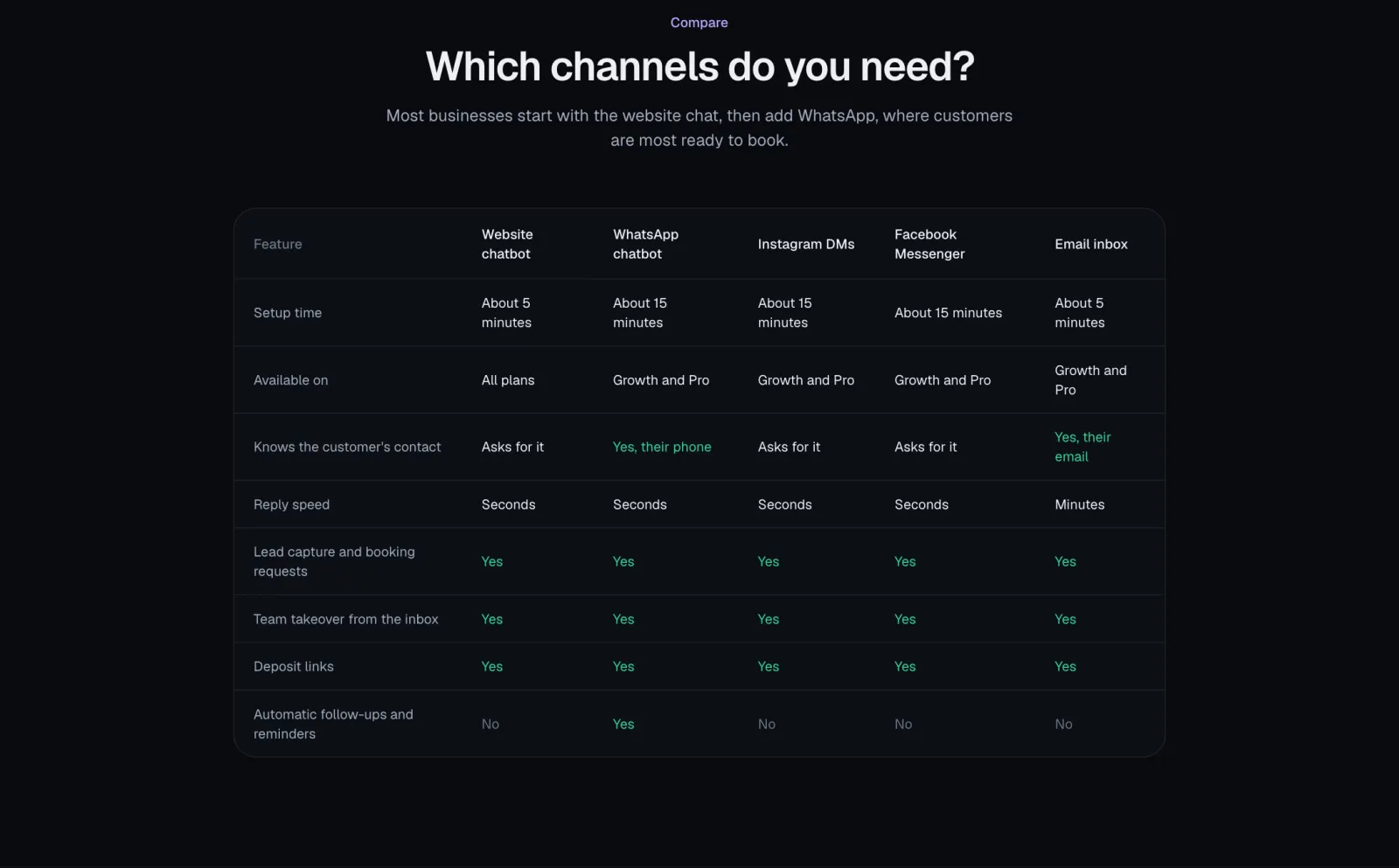 How the channels compare in setup time, availability and features
#How to measure whether it's working
Track a few simple numbers before and after:
- Response time: how long customers wait for a first reply. An AI assistant brings this down to seconds.
- Leads captured: how many conversations end with a name, number and clear intent.
- Bookings and deposits: how many leads become confirmed, ideally paid, bookings.
- After-hours conversations: how many enquiries arrive outside working hours that would previously have waited.
- Hours saved: time your team no longer spends on repetitive questions.
Sahayok AI shows these in your dashboard and sends a summary every Monday, so you can see exactly what the assistant is earning you.
#Final thoughts
A WhatsApp chatbot isn't about replacing your team's personal touch. It's about making sure no customer waits hours for an answer to a simple question, and that the ones ready to buy reach your team quickly, with all the details already collected.
Start small: answer the common questions, capture leads, and hand over cleanly. Then add follow-ups, reminders and deposits once you see it working.
Ready to answer every WhatsApp message in seconds? Set up your AI Sales Assistant, test it on your website for free, and connect WhatsApp when you're ready.
Create your free agent Book a demo
Every article is written by people who build and support Sahayok AI, and checked before it is published. How we write and review